Today I read this article, it is very interesting. And I agree most of the points he list there. Details please check. http://blog.matrixresources.com/blog/when-agilescrum-should-not-be-used
Below are the list of quotes which I think are useful.
1. Non-High Profile Project
2. Stable Technology
3. No Major Process Innovation
4. Requirements are Stable
5. Quick Time to Market not Needed
Resource Characteristics:
1. Inability to Co-located
2. Low Cost Talent Available
3. Team Size Varies
Company Characteristics:
1. Command and Control Company Culture: “dictator” type project management
2. Contracts Require Full Scope and Documentation
Showing posts with label my reading. Show all posts
Showing posts with label my reading. Show all posts
Wednesday, May 18, 2011


Monday, February 28, 2011
Regarding how to prioritize a bug fix
Today I read a very interesting article regarding regression testing.
Details please check http://www.ericsink.com/articles/Four_Questions.html
Every bug you found in your application, before you work on a fix, you should ask yourself below four questions:
Question One: When this bug happens, how bad is the impact? (Severity)
Question Two: How often does this bug happen? (Frequency)
Question Three: How much effort would be required to fix this bug? (Cost)
Question Four: What is the risk of fixing this bug? (Risk)
Details please check http://www.ericsink.com/articles/Four_Questions.html
Every bug you found in your application, before you work on a fix, you should ask yourself below four questions:
Question One: When this bug happens, how bad is the impact? (Severity)
Question Two: How often does this bug happen? (Frequency)
Question Three: How much effort would be required to fix this bug? (Cost)
Question Four: What is the risk of fixing this bug? (Risk)
Tuesday, August 17, 2010
Oracle Locks
1. Pessimistic Locking = select for update no wait
2. Optimistic Locking Using a Version Column,
3. Optimistic Locking Using a Checksum, CPU time
DEADLOCK is because foreign key is not indexed.
delete a parent will cause lock child table.
update or delete primary key will cause the same issue, when using ORM, the sql generated might do that.
2. Optimistic Locking Using a Version Column,
3. Optimistic Locking Using a Checksum, CPU time
DEADLOCK is because foreign key is not indexed.
delete a parent will cause lock child table.
update or delete primary key will cause the same issue, when using ORM, the sql generated might do that.
Wednesday, May 19, 2010
5 low-risk, high-reward experiments for IT
Just read one article which is very interesting.
http://www.infoworld.com/d/developer-world/5-low-risk-high-reward-experiments-it-454
Low-risk IT experiment No. 1: APIs
Low-risk IT experiment No. 2: Social networks
Low-risk IT experiment No. 3: Mobile apps
Low-risk IT experiment No. 4: Geocoding
Low-risk IT experiment No. 5: NoSQL
http://www.infoworld.com/d/developer-world/5-low-risk-high-reward-experiments-it-454
Low-risk IT experiment No. 1: APIs
Low-risk IT experiment No. 2: Social networks
Low-risk IT experiment No. 3: Mobile apps
Low-risk IT experiment No. 4: Geocoding
Low-risk IT experiment No. 5: NoSQL
Wednesday, April 28, 2010
zt: How to Keep Crappy Programmers
This is a follow-up to the popular How to Find Crappy Programmers. If you’re interested in having a team of crappy programmers, instead of those annoyingly bright and passionate good ones, you probably want to start there.
Despite your best efforts, some good programmers slip through the cracks – how can you get rid of them while keeping your coveted crappy programmers around?
1. Focus on Punctuality and Butt-In-Seat Time
Never mind that a good programmer can produce more valuable work in a 30-hour workweek from home than a crappy programmer can toiling 60 hours in the office. There’s no point in getting useful software in a timely manner if you don’t get the all-important face time.
Good products are nice, but there’s nothing more fulfilling in a manager’s life than seeing a roomful of people, heads-down, typing away in tiny cubicles at 8:00 am in the morning. Coming in at 9:30 am is wholly unacceptable – those guys are just having too much fun.
You get people on salary so that they aren’t on the clock, and that way you don’t have to pay extra when they work longer than 8 hour days. Then again, don’t be afraid to insist that they work at least 8 hour days all the time. Who cares if they have nothing to do, or if they have already gotten way more done than the guy next to them, surfing the internet? It’s butt-in-seat time, baby.
2. Set Their Salary Based on Their Age or Time at the Company
Setting salary based on your age makes a lot of sense since you, the manager, are probably old. That way you get more money. Since that’s illegal, you should base the pay on “years of experience” which equates to age for everyone who didn’t go on a 5-year+ sabbatical. Don’t worry, that’s pretty much only working moms, and you probably don ‘t want to pay them much either.
You might have an employee who’d rather be paid based on their productivity or the value of their work or even their skill level. Blasphemy! Clearly, that person is just looking for a free ride, without having to pay their dues. Say it with me people: “We care about everything except for the actual work you produce.”
3. Reduce Time Spent Coding
It’s important for developers to spend a lot of time in meetings. That way they can get a complete understanding of the minutia in the business side of things. And also, it’s more fun to have a big audience when you ramble on in meetings. Don’t worry that we won’t have any time left to do actual work (ie. coding), we’ll just come in early and stay late to get that part done.
Another fun thing is having your programmers do your desktop support. Really, anytime your Outlook or your iPhone is acting up, feel free to call them over to troubleshoot the issue. It’s so handy having geeks around.
4. Monitor and filter their Internet usage
Developers just can’t be trusted, everyone knows that. We are always hacking things and downloading illegal music and that sort of thing. So, you should definitely install a program to monitor their internet usage. You could also block sites that you deem to be a waste of time, but then that might tip your hand that you’re monitoring them.
For that matter, you ought to go ahead and dictate what development environment and tools they have to use. After all, you picked the setup with the longest feature list (not to mention the sales guy took you to lunch) so those developers shouldn’t have anything to complain about. Anyone who wants to use anything else is just a prima donna.
5. Make Them Build Crappy Software
This is the most important one of all. A crappy programmer can only make crappy software. However, a good programmer has the ability to make both good software and crappy software, right? Wrong!
Good programmers hate writing crappy software. They’re always yammering on about code design and trying to test everything, what a pain.
Force them to write inline queries, develop in VB on the command line and fix bugs in 1,000 line methods. They may fight it at first, but pretty soon they either leave or become a crappy programmer also. You’ll know that they’ve come over to the dark side when you see that empty look in their eyes and when they see a Dilbert cartoon they laugh … maniacally.
The reality is that not everyone is interested in managing good programmers. Sure they get things done and know a lot about technology … yadda yadda. They also challenge your assumptions and push to improve the system and that’s just not going to work in your business.
The fact that it’s been done that way before and hasn’t imploded yet (or lately) is good enough for you. You can use these handy tips to keep your crappy programmers while firmly excluding the good ones.
Despite your best efforts, some good programmers slip through the cracks – how can you get rid of them while keeping your coveted crappy programmers around?
1. Focus on Punctuality and Butt-In-Seat Time
Never mind that a good programmer can produce more valuable work in a 30-hour workweek from home than a crappy programmer can toiling 60 hours in the office. There’s no point in getting useful software in a timely manner if you don’t get the all-important face time.
Good products are nice, but there’s nothing more fulfilling in a manager’s life than seeing a roomful of people, heads-down, typing away in tiny cubicles at 8:00 am in the morning. Coming in at 9:30 am is wholly unacceptable – those guys are just having too much fun.
You get people on salary so that they aren’t on the clock, and that way you don’t have to pay extra when they work longer than 8 hour days. Then again, don’t be afraid to insist that they work at least 8 hour days all the time. Who cares if they have nothing to do, or if they have already gotten way more done than the guy next to them, surfing the internet? It’s butt-in-seat time, baby.
2. Set Their Salary Based on Their Age or Time at the Company
Setting salary based on your age makes a lot of sense since you, the manager, are probably old. That way you get more money. Since that’s illegal, you should base the pay on “years of experience” which equates to age for everyone who didn’t go on a 5-year+ sabbatical. Don’t worry, that’s pretty much only working moms, and you probably don ‘t want to pay them much either.
You might have an employee who’d rather be paid based on their productivity or the value of their work or even their skill level. Blasphemy! Clearly, that person is just looking for a free ride, without having to pay their dues. Say it with me people: “We care about everything except for the actual work you produce.”
3. Reduce Time Spent Coding
It’s important for developers to spend a lot of time in meetings. That way they can get a complete understanding of the minutia in the business side of things. And also, it’s more fun to have a big audience when you ramble on in meetings. Don’t worry that we won’t have any time left to do actual work (ie. coding), we’ll just come in early and stay late to get that part done.
Another fun thing is having your programmers do your desktop support. Really, anytime your Outlook or your iPhone is acting up, feel free to call them over to troubleshoot the issue. It’s so handy having geeks around.
4. Monitor and filter their Internet usage
Developers just can’t be trusted, everyone knows that. We are always hacking things and downloading illegal music and that sort of thing. So, you should definitely install a program to monitor their internet usage. You could also block sites that you deem to be a waste of time, but then that might tip your hand that you’re monitoring them.
For that matter, you ought to go ahead and dictate what development environment and tools they have to use. After all, you picked the setup with the longest feature list (not to mention the sales guy took you to lunch) so those developers shouldn’t have anything to complain about. Anyone who wants to use anything else is just a prima donna.
5. Make Them Build Crappy Software
This is the most important one of all. A crappy programmer can only make crappy software. However, a good programmer has the ability to make both good software and crappy software, right? Wrong!
Good programmers hate writing crappy software. They’re always yammering on about code design and trying to test everything, what a pain.
Force them to write inline queries, develop in VB on the command line and fix bugs in 1,000 line methods. They may fight it at first, but pretty soon they either leave or become a crappy programmer also. You’ll know that they’ve come over to the dark side when you see that empty look in their eyes and when they see a Dilbert cartoon they laugh … maniacally.
The reality is that not everyone is interested in managing good programmers. Sure they get things done and know a lot about technology … yadda yadda. They also challenge your assumptions and push to improve the system and that’s just not going to work in your business.
The fact that it’s been done that way before and hasn’t imploded yet (or lately) is good enough for you. You can use these handy tips to keep your crappy programmers while firmly excluding the good ones.
Friday, March 5, 2010
Testing what Errors
http://agile.dzone.com/news/alternatives-acceptance
* Programmer errors occur when a programmer knows what to program but doesn't do it right. His algorithm might be wrong, he might have made a typo, or he may have made some other mistake while translating his ideas into code.
* Design errors create breeding grounds for bugs. According to Barry Boehm (PDF), 20% of the modules in a program are typically responsible for 80% of the errors. They're not necessarily the result of an outright mistake, though. Often a module starts out well but gets crufty as the program grows.
* Requirements errors occur when a programmer creates code that does exactly what she intends, but her intention was wrong. Somehow she misunderstood what needed to be done. Or, perhaps, no one knew what needed to be done. Either way, the code works as intended, but it doesn't do the right thing.
* Systemic errors make mistakes easy. The team's work habits include a blind spot that lets subtle defects escape. In this environment, everybody thinks they're doing the right thing--programmers are confident that they're expressing their intent, and customers are confident that programmers are doing the right thing--yet defects occur anyway. Security holes are a common example.
* Programmer errors occur when a programmer knows what to program but doesn't do it right. His algorithm might be wrong, he might have made a typo, or he may have made some other mistake while translating his ideas into code.
* Design errors create breeding grounds for bugs. According to Barry Boehm (PDF), 20% of the modules in a program are typically responsible for 80% of the errors. They're not necessarily the result of an outright mistake, though. Often a module starts out well but gets crufty as the program grows.
* Requirements errors occur when a programmer creates code that does exactly what she intends, but her intention was wrong. Somehow she misunderstood what needed to be done. Or, perhaps, no one knew what needed to be done. Either way, the code works as intended, but it doesn't do the right thing.
* Systemic errors make mistakes easy. The team's work habits include a blind spot that lets subtle defects escape. In this environment, everybody thinks they're doing the right thing--programmers are confident that they're expressing their intent, and customers are confident that programmers are doing the right thing--yet defects occur anyway. Security holes are a common example.
Monday, January 4, 2010
Wednesday, October 14, 2009
Wednesday, October 7, 2009
waterfall vs rup vs scrum vs lean

Recently I got a very interesting blog regarding difference between above project methods.
Here’s a VERY simple overview of the main differences between Waterfall Development, Iterative Waterfall Development, Scrum/Agile Development and Lean.
Waterfall Development
‘Waterfall Development’ is another name for the more traditional approach to software development.
It’s called ‘waterfall’ as this type of development is often planned using a Gantt chart – you complete one phase (e.g. planning) before moving on to the next phase (e.g. development).
In Waterfall approaches, you will rarely aim to re-visit a ‘phase’ once it’s completed. As such, you better get whatever you’re doing right the first time!
This approach is highly risky, often more costly and generally less efficient than more Agile approaches.
The main issues with this approach include:
- You don’t realise any value until the end of the project (when you deploy) (See: Self-Funding Projects, a Benefit of Agile Software Development)
- You leave the testing until the end, which means you’re leaving issue discovery until late in the day
- You don’t seek approval from the stakeholders until late in the day – their requirements might have changed
- You’re heavily reliant upon a plan, which you can/will often follow to the detriment of the end result
- You’re heavily reliant upon a project manager driving the way – the power of one
Iterative Waterfall Development
This approach carries less risk than a traditional Waterfall approach but is still far more risky and less efficient than a more Agile approaches.
The focus is on delivering a sprint of work as opposed to a series of valuable/shippable features.
The most commonly occurring issue in this type of scenario (in my experience) is bottle necking.
For example, you deliver loads of code a little bit behind schedule (?) and you leave it until the last minute to test everything. One issue takes longer than expected to resolve, you miss your sprint deadline and you deliver nothing.
Another common symptom of this type of approach is over-commitment. It’s really difficult to estimate the total effort associated with a particular User Story/Feature when approaching delivery in this phased way.
You’re more or less forced to estimate each phase separately (e.g. estimate development separately to testing in this instance) – this doesn’t work as the phases are not separate, they’re totally intertwined.
For example, if you find an issue with the test, you must return to development. The whole team must remain focused on delivering the end goal, not the separate phases.
It’s also worth noting that velocity and burn downs are far less (if at all) useful in this type of environment – you don’t benefit from early-warning-signs as you don’t find out whether you’re on track until the end of the sprint.
Scrum Development
This approach carries far less risk than Waterfall approaches.
We focus on delivering fully-tested, independent, valuable, small features. As such, we diversify our risk – if one feature goes wrong, it should not impact another feature.
With that said, we still plan our work in iterations and we will still release at the end of each iteration.
Lean Development
Lean is very similar to Scrum in the sense that we focus on features as opposed to groups of features – however Lean takes this one step further again.
In Lean Development, you select, plan develop, test and deploy one feature (in its simplest form) before you select, plan, develop, test and deploy the next feature. By doing this, you further isolate risk to a feature-level.
In these environments, you aim to eliminate ‘waste’ wherever possible – you therefore do nothing until you know it’s necessary or relevant.
Tuesday, October 6, 2009
Why software is expensive
I just read a post from http://itscommonsensestupid.blogspot.com/2009/10/why-software-is-expensive.html, it is very interesting, below it is the points.
- Software is expensive because there are huge overhead costs associated with software development. Computer equipments are expensive. And the fact that software developers need to stay on the cutting edge of the technology means that they need to always upgrade their hardware. Also, software methodologies and tools change very often, software developers need to invest a lot of time and money to just to keep up with the development so that they can provide better service to their clients next time.
For those of you who think that hardware cost is "just of small fraction of the total cost", let me tell you that hardware is not cheap in third world countries; a mere acer laptop is costing as much as a programmer's one month salary here in Malaysia. - Software is expensive because there are a lot of research going into it. Some express puzzle at software developer apparent "low productivity" (20 lines of code per day). Assuming that you are charging USD 50 per hour, your rate is USD 20/line. This is awfully expensive to the business owners who measure productivity in terms of quantity produced. What they miss out is that programming productivity is all about writing less code to get your job done. A programmer could spend one billable month reinventing the wheel and produce a 10 million line-of-code ORM that is buggy, or spend one non-billable month to look for an open source implementation that is mature and well-developed, and endure the complain of low productivity. The way business owners complain about "research time" is encouraging the wrong type of behavior.
- Software is expensive because the product owners don't know what they want. Imagine if you go to an architect, asking him to provide a blue print, and after he comes out with that you ask him to change it according to your latest taste-- even though it is contrary to the original specification, and you repeat this process,.. No one would dare to do this, but everyone seems to have no problem asking the software developers to change their code at last minute and expect everything to work just fine and the product ships in time and worse of all, is not willing to pay extra.
- Software is expensive because it is customized only for you. The reason why Microsoft Office and Windows Vista is so cheap, is because the development cost is spread over million of users. The consequence of this is that there is no competitive advantage associated with the ordinary office or Windows Vista users. Your customized application, on the other hand, is designed especially for you, and you-- and no one else-- can enjoy the returns and benefits bring forth by the application.
Thursday, September 17, 2009
OOP principal
The first five principles are principles of class design. They are:
The next six principles are about packages. In this context a package is a binary deliverable like a .jar file, or a dll as opposed to a namespace like a java package or a C++ namespace.
The first three package principles are about package cohesion, they tell us what to put inside packages:
The last three principles are about the couplings between packages, and talk about metrics that evaluate the package structure of a system.
| SRP | The Single Responsibility Principle | A class should have one, and only one, reason to change. |
| OCP | The Open Closed Principle | You should be able to extend a classes behavior, without modifying it. |
| LSP | The Liskov Substitution Principle | Derived classes must be substitutable for their base classes. |
| DIP | The Dependency Inversion Principle | Depend on abstractions, not on concretions. |
| ISP | The Interface Segregation Principle | Make fine grained interfaces that are client specific. |
The next six principles are about packages. In this context a package is a binary deliverable like a .jar file, or a dll as opposed to a namespace like a java package or a C++ namespace.
The first three package principles are about package cohesion, they tell us what to put inside packages:
| REP | The Release Reuse Equivalency Principle | The granule of reuse is the granule of release. |
| CCP | The Common Closure Principle | Classes that change together are packaged together. |
| CRP | The Common Reuse Principle | Classes that are used together are packaged together. |
The last three principles are about the couplings between packages, and talk about metrics that evaluate the package structure of a system.
| ADP | The Acyclic Dependencies Principle | The dependency graph of packages must have no cycles. |
| SDP | The Stable Dependencies Principle | Depend in the direction of stability. |
| SAP | The Stable Abstractions Principle | Abstractness increases with stability. |
Monday, August 24, 2009
Insteresting reading points
A. Once you have a direction, you stick to it. But no matter how far you traveled to a wrong direction, turn around.
B. If the only tool you have is a hammer, then everything looks like a nail.
C. Nothing is permanent than temporary patch in a system.
B. If the only tool you have is a hammer, then everything looks like a nail.
C. Nothing is permanent than temporary patch in a system.
Monday, July 13, 2009
Junit best pratise
JUnits - Do’s and Dont’s
Posted by: Mahesh Tabib on July 10, 2009 DIGG
After the Junit cleanup last whole month, here are my few cents.A JUnit test case can contain multiple tests. Each test is implemented by a method. The declaration of a test method must comply to a set of conventions in order to help JUnit and associated tools to automate the discovery and execution of tests. These conventions are:
1. The name of the method must begin with “test”, like in “testValidateOperator”,
2. The return type of a test method must be null,
3. A test method must not throw any exception,
4. A test method must not have any parameter.
There are a few details of which you should be aware of when writing JUnit tests. First of all, when executing a test case, JUnit will instantiate the test case class as many time as there are test methods. That is, each test method will be executed on a different instance of the test case class. Before calling the test method, JUnit will call the setUp() method. The tearDown() method will be called after the test method completes – successfully or not. The setUp() and tearDown() methods should be used to create and then clean up the test environment.
Good practices to be followed while writing a JUnit:
• Write tests for methods that have the fewest dependencies first. If you start by testing a high-level method, your test may fail because a subordinate method may return an incorrect value to the method under test. This increases the time spent finding the source of the problem, and you will still have to test the subordinate method anyway to be sure it does not contain other bugs.
• Tests should be logically simple as possible, preferably with no decisions at all. Every decision added to a test method increases the number of possible ways that a test method can be executed. Testing is meant to be a controlled environment; the only thing you want to change is the input to the method under test, not the test method itself.
• Wherever possible, use constant as expected values in your assertions instead of computed values. Consider these two assertions:
returnVal = getDiscountCode(input);
assertEquals(returnVal, computeDiscountCode(input));
assertEquals(returnVal, “023”);
In order for computeDiscountCode() to return the proper result it probably has to implement the same logic as the getDiscountCode(), which is what you are trying to test for in the first place. Further, suppose you fixed a defect in the getDiscountCode (). Now you have to change computeDiscountCode () in the same manner. The second assertion is easier to understand and maintain.
• Each unit test should be independent of all other tests.
A unit test should execute one specific behavior for a single method. Validating behavior of multiple methods is problematic as such coupling can increase refactoring time and effort. Consider the following example:
void testAdd()
{
int return1 = myClass.add(1,2);
int return2 = myclass.add(-1,-2);
assertTrue (return1 – return2 == 0);
}
If the assertions fails in this case, it will be difficult to determine which invocation of add() caused the problem.
• Each unit test should be clearly named and documented.
The name of the test method should clearly indicate which method is being tested because improperly named tests increase maintenance and refactoring efforts. Comments should also be used to describe the test or any special conditions.
• All methods, regardless of visibility, should have appropriate unit tests.
Public, private and protected methods that contain data and decisions should be unit tested in isolation.
• One assertion per test case.
Avoid using multiple assertions in one test case. For example, if a test case with five assertions fails on the first assertion, then the remaining four are not executed. Only when the first assertion is corrected will the other assertions execute. If assertion two fails, then that also must be corrected before the remaining three assertions are verified. Although the unit test file may be large, it will be easier to find and fix defects.
• Create unit tests that target exceptions.
Exceptions are thrown when a method finds itself in a state it cannot handle. These cases should be tested just like a method’s normal state of operations. If a method is declared to throw one or more exceptions, then unit tests must be create that simulate the circumstances under which those exceptions could be thrown. The unit tests should assert that the exceptions are thrown as expected.
Please let me know if this helps. Happy coding Junits…!!
Tuesday, July 7, 2009
Reading: Tomcat security for clear password
How to Secure Tomcat Database Passwords for Java
In production environments there are features of Tomcat that don't pass security audit reviews
| October 3, 2007 11:45 AM EDT | Reads: | 30,463 |
Tomcat is a great reference implementation of the Java EE specification and is intended for desktop use by developers who are starting to learn about Java EE or those who work on enterprise applications and need an EE server for development. However because Tomcat is free it finds its way into production environments. In this environment there are features of Tomcat that don't pass security audit reviews. One of these features is the use of clear text passwords in the server.xml file to create data sources. The purpose of this article is to show how encryption of the username and password can be implemented thus closing a potential security vulnerability.

auth="Container"
type="javax.sql.DataSource"
/>
The name attribute defines where the resource is bound in JNDI. The auth attribute will have either the value Application or Container. Container means Tomcat will provide the username and password to connect to the resource whereas Application means the application will provide them. Container is specified because the username and password will be entered in server.xml. The type attribute is the fully qualified name of the class returned when the resource is looked up using JNDI.
Next the resource needs to be configured. This is the purpose of the
The name attribute has the value jdbc/TestDB, which must match a
Finally, the application has to be configured to use this data source. This is done by referencing the data source in /META-INF/context.xml of the application's WAR. A
name="jdbc/SpiderMan"
type="javax.sql.DataSource"
/>
The type attribute is the fully qualified name of the class returned when the resource is looked up using JNDI. The global attribute must match a
CIO, CResources
For development environments or personal use this configuration is acceptable, however, in a production environment the clear text username and password in
While Yahooing! I was surprised to discover I couldn't find any instructions addressing this issue. Most search results related to debating if securing the clear text username and password is even necessary. The general consensus seemed to be this security is not necessary for two reasons. One, if an intruder compromises a production server in a way that would allow read access to server.xml then the clear text username and password is the least security concern. Two, Tomcat is a reference implementation so it shouldn't be used in a production environment. Although these are lively debates and can spark great topics of conversation they do not address the issue. What I need is a way to get rid of the clear text username and password.
I will present three possible solutions to this issue. The first two are custom solutions involving application updates while the third takes advantage of Tomcat's built-in extensibility, requires no application updates and so is a much more attractive solution.
The first solution is to bypass Tomcat altogether and not configure a data source. With no data source there's no clear text username and password in server.xml so the problem is solved. However applications still need database connections. With no container-managed database pool each application will have to do its own pooling. This brings up all sorts of problems. Applications will need knowledge of the database and how to access it, unnecessary plumbing code is needed to manage the pool, data access objects will no longer be coded to EE specs making them less portable, no built-in or plug-in transaction management resulting in more plumbing code, an ever-growing number of connections as more applications are developed, performance degradation during high-traffic periods as connections become scarce, support overhead from managing many individual configurations, and the list goes on. It's possible each of these problems can be solved but as you solve them your code moves further and further from the EE specs. Because of all these problems, this is not an attractive solution.
The second solution is to move the responsibility for database authentication from Tomcat to the application. Recall the auth attribute of the
The third solution is to take advantage of Tomcat's built-in extensibility. Inside the
The source code for BasicDataSourceFactory has two important methods. They are:
public Object
getObjectInstance(
Object o
, Name n
, Context c
, Hashtable h)
public static DataSource
createDataSource(
Properties p
)
Tomcat creates an instance of BasicDataSourceFactory by calling its no-argument constructor. When a DataSource is needed the getObjectInstance(...) method is called. The BasicDataSourceFactory class implements this method in the following way. First it typecasts the Object parameter to Reference. Then all of the name/value pairs are removed from the Reference object and set in a Properties object. Finally, the Properties object is passed to the createDataSource(...) method where it's assumed the username and password exist in the Properties object as clear text.
To secure Tomcat database usernames and passwords, create a new class named EncryptedDataSourceFactory that extends BasicDataSourceFactory. This new class is going to override the getObjectInstance(...) method. The new method is implemented in the following way. First it will remove the encrypted username and passwords from the Reference object. Next, it will decrypt them. Then it will put the decrypted values into the Reference object. Finally it will call the getObjectInstance(...) method of the super class so it can take care of creating the DataSource. See the source code in Listing 3.
In the source code the "username" string of the setUsername() method and the "password" string of the setPassword() method refer to the
CIO, CTO & Developer Resources
These strings have corresponding constants in the BasicDataSourceFactory class but the constants are declared private so can't be used. The find() method throws an exception if not found because decryption will fail if there's nothing to decrypt. The decrypt() method uses a Base64 decoder that isn't secure but adequately demonstrates the concept. Finally the replace() method removes the encrypted values and puts in the decrypted values. When getObjectInstance(...) of the super class is called, it has the clear text passwords and is completely unaware that the values in server.xml are actually encrypted.
Using EncryptedDataSourceFactory is simple. First drop the org.moss.jdj.jdbc-yyyy.mm.dd.x.jar file into TOMCAT/server/lib. Next, get a Base64 encoding of the username and password. A simple Yahoo! search of "online base64 encoder" will find sites that will do it. Finally, edit server.xml and replace the username and password values with their corresponding Base64 equivalents and set the factory value to org.moss.jdj.dbcp.EncryptedDataSourceFactory. Start up Tomcat and see it in action.
Using Tomcat's built-in extensibility like this is an attractive solution. It fulfills security audit requirements by removing clear text usernames and passwords but it also lets applications be coded to EE specs. Using this solution doesn't put any unnecessary or unwanted responsibility in applications. Applications can be developed to fulfill business requirements and don't have to worry about plumbing code like initializing or shutting down a database connection pool properly, maintaining a custom transaction system to roll back on errors, or implementing an encryption strategy. Plus, when the time comes to move away from Tomcat the applications will be ready. The code in Listing 3 will be thrown away but small amounts of throwaway code is much better than the effort needed to go back and update applications.
Reading "To ESB or not to ESB"
To ESB or not to ESB
 Ross Mason
 July 6th, 2009

Many of us have had to ponder this question. Technology selection is notoriously difficult in the enterprise space since the criteria and complexity of the problem is often not fully understood until later in the development process.
There is an interesting post from ThoughtWorker Erik Dörnenburg with the unfortunate title “Making the ESB pain Visible”. Erik provides a real-world example of when not to use an ESB citing that -
Based on conversations with the project sponsors I began to suspect that at least the introduction of the ESB was a case of RDD, ie. Resume-Driven Development, development in which key choices are made with only one question in mind: how good does it look on my CV? Talking to the developers I learned that the ESB had introduced “nothing but pain.” But how could something as simple as the architecture in the above diagram cause such pain to the developers? Was this really another case of architect’s dream, developer’s nightmare?
Later, Erik quite rightly points out that an ESB should not have been used in this scenario. This is a fairly common problem for ESBs and other enterprise technology like BPM/BPEL where the technology is not chosen for the right reasons and then the technology gets blamed when the project struggles. Given that much of the enterprise software disillusionment today stems from the incorrect usage of the technology I thought I’d offer some rough guidelines for selecting an ESB.
ESB selection checklist
Mule and other ESBs offer real value in scenarios where there are at least a few integration points or at least 3 applications to integrate. They are also well suited to scenarios where loose coupling, scalability and robustness are required.
Here is a quick ESB selection checklist –
- Are you integrating 3 or more applications/services? If you only need to communicate between 2 applications, using point-to-point integration is going to be easier.
- Will you really need to plug in more applications in the future? Try and avoid YNNI in your architecture. It’s better to keep things simple re-architect later if needed.
- Do you need to use more than one type of communication protocol? If you are just using HTTP/Web Services or just JMS, you’re not going to get any of the benefits if cross protocol messaging and transformation that Mule provides.
- Do you need message routing capabilities such as forking and aggregating message flows, or content-based routing? Many applications do not need these capabilities.
- Do you need to publish services for consumption by other applications? This is a good fit for Mule as it provides a robust and scalable service container, but in Erik’s use case all they needed was an HTTP client from their front-end Struts application.
- Do you have more than 10 applications to integrate? Avoid big-bang projects and consider breaking the project down in to smaller parts. Pilot your architecture on just 3 or 4 systems first and iron out any wrinkles before impacting other systems.
- Do you really need the scalability of an ESB? It’s very easy to over-architect scalability requirements of an application. Mule scales down as well as up making it a popular choice for ‘building in’ scalability. However, there is a price to be paid for this since you are adding a new technology to the architecture.
- Do you understand exactly what you want to achieve with your architecture? Vendors often draw an ESB as a box in the middle with lots of applications hanging off it. In reality, it does not work like that. There is a lot details that need to be understood first around the integration points, protocols, data formats, IT infrastructure, security etc. Starting small helps to keep the scope of the problem manageable and keep the fuckupery to a minimum. Until you understand your architecture and scope it properly you can’t really make a decision as to whether an ESB is right for you.
- Generally, always validate a product solution for your needs. Don’t choose an ESB or any other technology because –
- It will look good on my resume
- I don’t need the features today but there is a remote chance that I _might_ in future
- I had a great golfing weekend with the head of sales
This checklist is not exhaustive, but will help clarify when not to use an ESB. Once you have decided that an ESB is a good fit for your project you’ll want to add additional selection criteria such as connectivity options, robustness, error management, service repository, performance, data support, etc. The important thing to remember is that there is no silver bullet for good architecture and you need to know your architecture before making a technology decision.
With this checklist in mind it’s easy to see that Erik’s example never needed an ESB in the first place.
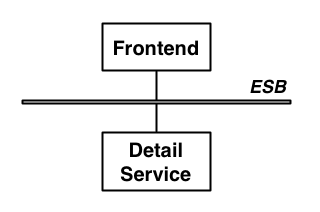
However, if the architecture looked something more like this, then an ESB would have probably been a good fit.

Choosing Mule
Obviously, as the creator of Mule I have some bias for wanting everyone to use Mule. However, it is critical to the continued success of the Mule project and to MuleSource that users understand when not to use an ESB. Open source makes a lot of sense for enterprise software because projects need time to try out the technology and refine their proposed architecture. Having access to the product and source code helps a huge amount in this discovery process and allows the customer to make an informed decision.
In fact the MuleSource business model hinges on the ability of the user to self-select Mule and approach us only when they need development or production support. This has been working very well for everyone involved. Customers get to do a proof of concept (PoC) with our product knowing that if they end up using it for a mission critical application that they can get professional 24×7 support. For MuleSource it means that our customers buy from us rather than us selling to them, so they always get what they want – this is a far cry from the old proprietary upfront license model that used to hold the enterprise market hostage.
Tuesday, June 23, 2009
Spring JPA annotation transaction.
It has been weeks I could not figure out why I can not use annotation based transaction control, and it forced me to use programmatic transaction control. Today I found this post from theserverside, which explains everything.
it's caused by the use of the BeanFactory instead of an ApplicationContext, which is used inside the unit test, behind the scene when using the AbstractJpaTests base class.
If you change your Main class to
it will work.
The reason for that is a slightly different behavior between a BeanFactory and an ApplicationContext when it comes to BeanPostProcessors. From the Spring reference manual:
It is important to know that a BeanFactory treats bean post-processors slightly differently than an ApplicationContext. An ApplicationContext will automatically detect any beans which are defined in the configuration metadata which is supplied to it that implement the BeanPostProcessor interface, and register them as post-processors, to be then called appropriately by the container on bean creation. Nothing else needs to be done other than deploying the post-processor in a similar fashion to any other bean. On the other hand,
when using a BeanFactory implementation, bean post-processors explicitly have to be registered, with code
like this:
ConfigurableBeanFactory factory = new XmlBeanFactory(...);
// now register any needed BeanPostProcessor instances
MyBeanPostProcessor postProcessor = new MyBeanPostProcessor();
factory.addBeanPostProcessor(postProcessor);
// now start using the factory
This explicit registration step is not convenient, and this is one of the reasons why the various
ApplicationContext implementations are preferred above plain BeanFactory implementations in the vast majority of Spring-backed applications, especially when using BeanPostProcessors
That's the whole reason, why your PersistenceAnnotationBeanPostProcessor never got loaded and therefore couldn't do its work!
it's caused by the use of the BeanFactory instead of an ApplicationContext, which is used inside the unit test, behind the scene when using the AbstractJpaTests base class.
If you change your Main class to
Code:
public class Main {

public static void main(String[] args) {
ApplicationContext ctx = new ClassPathXmlApplicationContext("context/testContext.xml");
PersonDAO dao=(PersonDAO)ctx.getBean("personDAO");

Person p=new Person();
p.setFirstName("testName");
dao.save(p);
}
} The reason for that is a slightly different behavior between a BeanFactory and an ApplicationContext when it comes to BeanPostProcessors. From the Spring reference manual:
It is important to know that a BeanFactory treats bean post-processors slightly differently than an ApplicationContext. An ApplicationContext will automatically detect any beans which are defined in the configuration metadata which is supplied to it that implement the BeanPostProcessor interface, and register them as post-processors, to be then called appropriately by the container on bean creation. Nothing else needs to be done other than deploying the post-processor in a similar fashion to any other bean. On the other hand,
when using a BeanFactory implementation, bean post-processors explicitly have to be registered, with code
like this:
ConfigurableBeanFactory factory = new XmlBeanFactory(...);
// now register any needed BeanPostProcessor instances
MyBeanPostProcessor postProcessor = new MyBeanPostProcessor();
factory.addBeanPostProcessor(postProcessor);
// now start using the factory
This explicit registration step is not convenient, and this is one of the reasons why the various
ApplicationContext implementations are preferred above plain BeanFactory implementations in the vast majority of Spring-backed applications, especially when using BeanPostProcessors
That's the whole reason, why your PersistenceAnnotationBeanPostProcessor never got loaded and therefore couldn't do its work!
Tuesday, June 16, 2009
From dzone.com: Three Questions About Each Bug You Find
Three Questions About Each Bug You Find
I really love this timeless Tom Van Vleck article from 1989. It teaches us to ask ourselves:
Three Questions About Each Bug You Find
Those questions being:
- Is this mistake somewhere else also?
- What next bug is hidden behind this one?
- What should I do to prevent bugs like this?
When I first read these rules, I was foolish enough to think:
'Cute, But Too Obvious! i do this intuitively all the time.'
But watch yourself closely! I've caught myself out on occasion, and maybe you will too.
I'm making an effort to be more explicit about the three questions. Maybe i'll end up fixing related problem
Subscribe to:
Posts (Atom)